
MCP integration
popkit MCP
Connect popkit to the AI assistant you already use — it can read your data, draft posts, schedule them and reply to comments. One browser sign-in; most clients need no key at all.
The endpoint
https://popkit.loxily.com/api/mcpThat URL is the whole integration. No API key to request, no SDK to install.
Pick your app
claude.ai · desktop · Claude Code
- 01Copy the endpoint
https://popkit.loxily.com/api/mcp - 02Add it as a custom connector
Settings → Connectors → Add custom connector, paste the URL. Claude Code is one command:
claude mcp add --transport http popkit https://popkit.loxily.com/api/mcp - 03Approve
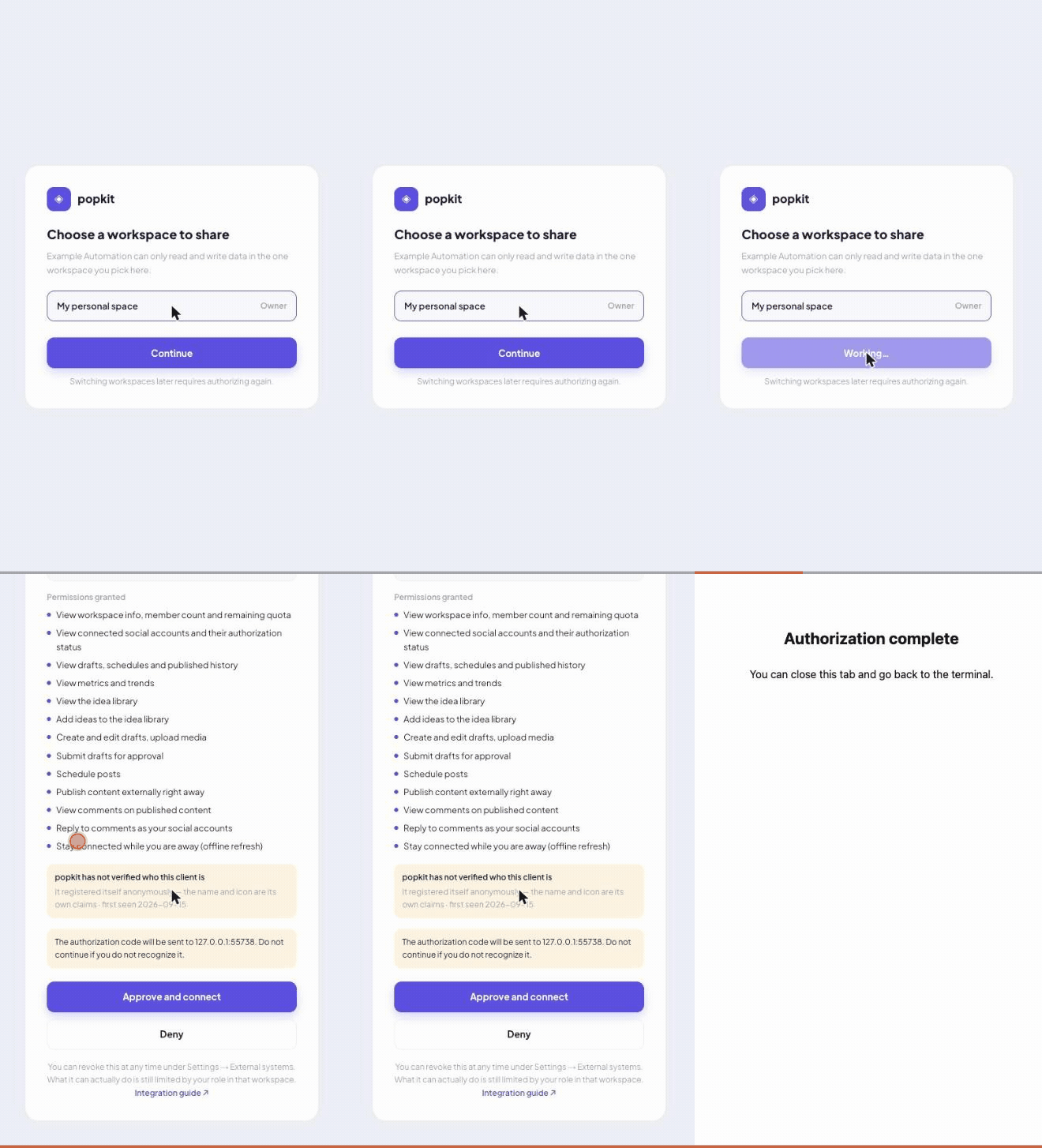
The browser opens once: sign in → pick a workspace → approve.
See what the browser step looks like
Then just say it
| Say something like | What it does |
|---|---|
| «Plan next week's content for me, based on what did well in the last 30 days» | Plan this week's content from accounts and the last 30 days of data. |
| «Take the «autumn launch» idea and turn it into drafts for each platform» | Expand one idea into multi-platform drafts (ideaId supports completion). |
| «Review the last batch we published — which did best, and why» | Post-mortem on the latest batch of published posts. |
| «Which comments are still unanswered? Reply to the easy ones» | Triage comments and suggest replies; only suggests replying when comments:write is granted. |
Publishing is two-step: the assistant saves a draft for you to look at and only sends it once you say go. It can never do more than your own role in that workspace allows.
20 tools, no API key
- Workspace & accounts(2)
get_workspace_context·list_accounts - Reading content(3)
list_posts·get_post·check_publish_constraints - Writing content(7)
create_post·update_post·attach_media·suggest_covers·set_post_cover·reschedule_post·submit_for_approval - Publishing(2)
confirm_publish·publish_post - Comments(2)
list_comments·reply_comment - Idea board(3)
list_ideas·create_idea·update_idea - Analytics(1)
get_analytics_summary
Your assistant picks the right one. Scopes and idempotency keys: Tool reference.
Questions people ask
Do I need an API key?
Most clients, no — OAuth, one browser sign-in. Only unattended work (cron jobs, server scripts) really wants a long-lived key.
Can it post for me?
Yes, if you granted the «publish» tier — and every publish still asks you to confirm. Grant read-only scopes and it cannot even touch a draft.
How do I revoke it?
Settings → Connected systems. An already-issued OAuth token lives at most 1 more hour; a long-lived key dies on its next call. Changing your password disconnects everything immediately.
How many workspaces does one credential see?
One. It is fixed at authorization time and no parameter can switch it — authorize again for another workspace.
What if I leave the team?
It stops working on the next call. No separate revocation needed.
Which platforms does this cover?
X, YouTube, TikTok, Instagram, Facebook Pages and Threads — exactly what you can connect in popkit itself.
Something failed — where do I look?
Errors & fixes lists each code with its cause and what to do; how permission is computed is in Auth & security.
Changelog
2026-09-15 · Connecting Cursor is now one URL
Connecting Cursor is now one URL: popkit hosts its client metadata document at
/.well-known/mcp-client/cursor, so there is nothing to publish and no key to keep. Cursor does not self-register and only accepts a typed client_id — this document is what it needs.2026-09-15 · A daily total cap on comment replies
Comment replies now have a daily total cap, 500 by default (per credential × workspace, counted separately from the publish cap) and tunable by operators. It is a deliberately generous backstop: replies skip the platform-quota precheck, so without it a runaway integration could post all day at five per minute. Normal use — even staffing several accounts — will not reach it.
2026-09-15 · Dynamic Client Registration open — n8n / Dify can use OAuth
Dynamic Client Registration is now open on production. Integrations that register themselves — n8n, Dify — can use OAuth directly: leave their «Use Dynamic Client Registration» switch on, paste the endpoint URL, and skip the long-lived key. The real reason they could not connect before was that their UI requires a client secret while a registration-free CIMD client cannot have one by spec — not «they only support DCR» as our docs used to say. Registering a loopback callback (
http://localhost:PORT/...) now works too.2026-09-14 · Scheduling now counts against a per-credential daily cap
action:"schedule" now counts against a per-credential daily cap (previously only the monthly plan quota applied). For class-A OAuth credentials scheduling shares the 20-per-day publish cap; class-B long-lived keys get a separate, wider schedule budget, 100/day by default and tunable by operators. The same-account interval does not apply to scheduling — it guards against two real sends landing too close together, and a scheduled send happens later.2026-09-14 · A cap on replies to the same comment
reply_comment no longer lets force run unbounded: one comment accepts at most 3 replies from you per 24 h (counted per platform comment, shared across workspaces); beyond that you get rate_limited with params.reason=comment_reply_cap. Replying to your own reply is also rejected now (passing a returned replyRowId as commentId gives not_found). The daily publish cap and the same-account interval still do not apply to comment replies — replying to a batch of comments is normal use and must not be throttled by quotas designed for posting content.2026-09-14 · Tokens renew silently instead of re-authorizing hourly
OAuth authorization now requests offline_access: clients receive a refresh token and renew silently instead of re-opening the browser every hour. Already-connected clients will see the consent screen once more.
2026-09-14 · Discovery no longer advertises client_credentials
Authorization-server metadata no longer advertises
client_credentials (the grant was never usable in production); discovery lists only authorization_code and refresh_token.2026-09-14 · Doc corrections: confirmation steps and rate-limit scopes
Doc corrections (no behaviour change): the schedule tier and publish_post each take one call with no confirmation step — only publish-on-create is two-step; and the three rate limits now state their real scopes, the same-account interval being shared per workspace.
2026-09-14 · Client setup is now a capability check
Client setup is now a capability check: the dividing line is whether your client speaks CIMD, not which product it is. A new "Any other MCP client" section covers how to tell, and how to host your own metadata document — which puts the no-registration path within reach of any OAuth client that lets you type a
client_id (loopback callbacks included).2026-09-11 · The guide is now multi-page
The guide is now multi-page (overview / quick start / client setup / tool reference / auth / errors), with real config snippets per client.
2026-09-11 · Omitting targetAccountIds now means every usable account
Omitting targetAccountIds now means every usable account on the requested platforms (expired ones skipped, max 20 per call) instead of just the most recently connected one; the selection is stored at creation; omitting the field on update_post keeps the existing selection.
2026-09-10 · Public integration guide; long-lived keys can carry an expiry
Public integration guide; long-lived keys can carry an expiry, and workspace admins are notified 7 / 1 days before expiry and when a key fails a lot.
2026-09-10 · MCP endpoint opened on production, comment tools added
MCP endpoint opened on production (DCR off); list_comments / reply_comment tools and the comment_triage prompt; operators can tune global rate limits.
2026-09-09 · Write-side tools and long-lived keys
Write side: create_post / update_post with three publish tiers, attach_media, two-step confirm_publish, reschedule_post, submit_for_approval; class-B long-lived keys (popkit_it_…).
2026-09-08 · First release: read tools and OAuth
First release: read tools, OAuth 2.1 + CIMD, four prompt templates, three resources.